It is not an ecommerce site
That's the first thing to say about VivahStyle, because every other decision follows from it. Customers never open the app. Store staff drive it, on tablets, standing next to the customer.
The thing it replaces is the usual boutique consultation: someone walks in, staff ask a few questions, pull out whatever's near the front, and the customer leaves having seen forty outfits and remembering none. Nobody wrote anything down, so the store learns nothing either.
What it replaces it with is a flow:
onboard → explore → AI-suggested matches → try-on → bill → analyse
About two minutes of structured onboarding, a filtered grid, a scored shortlist for this customer, a generated preview of them wearing the outfit, an invoice, and a dashboard that finally knows what sells.
Shape of it
flowchart TD
  M["Marketing page<br/>static public/index.html at /"] --> T["/try<br/>email-OTP demo gate"]
  T --> L["/login<br/>store gate"]
  L --> P["proxy.ts<br/>role gate for every route"]
  P --> APP["app/(app)/<br/>one route group, role-aware nav"]
  APP --> API["app/api/<br/>auth · inventory · recommendations · tryon · couple"]
  APP -. "server actions" .-> LIB
  API --> LIB["lib/<br/>auth.ts · scoring/ · insforge/ · format · posthog"]
  LIB --> INS[("InsForge<br/>Postgres + buckets")]
  LIB --> G["Groq Vision<br/>inventory auto-fill"]
  LIB --> O["OpenAI gpt-image-2<br/>virtual try-on"]
  LIB --> PH["PostHog<br/>7 events"]
Two details in there cost real time to arrive at.
proxy.ts, not middleware.ts. That's Next 16's convention for the same file, and it's the role gate for every route in the app.
One app/(app)/ group, not three. The obvious layout for a three-role app is (stylist), (cashier), (admin) - and Next forbids it, because two route groups can't resolve to the same URL path. So there's a single group with role-aware navigation, and role checks live in the gate and in every route handler and server action via requireRole(). Two enforcement points, deliberately: the gate is a convenience, the handler check is the actual security boundary.
Sessions are HMAC-signed cookies with bcrypt password hashing - no third-party auth library, no component library, no state manager. That's by design in this codebase.
Three roles, three home pages
| Role | Device | Can do |
|---|---|---|
| Stylist | Tablet | Onboarding, explore, Shop Suggested, virtual try-on |
| Cashier | Tablet / desktop | Billing, returns |
| Owner | Desktop | Inventory CRUD, Groq auto-fill, dashboard, billing, returns, staff & store settings |
Each role lands on its own page at login: Stylist → /onboarding, Cashier → /billing, Owner → /dashboard. The role comes from the password entered at the store gate, which is the right amount of ceremony for a shared tablet behind a counter.
Where the AI is - and where it deliberately isn't
flowchart LR
  subgraph AI["Generative"]
    direction LR
    A1["Dress photo"] --> A2["Groq Vision<br/>llama-4-scout"] --> A3["Draft fields<br/>editable"] --> A4[("inventory_items")]
    B1["Customer photo<br/>+ garment"] --> B2["gpt-image-2"] --> B3["Try-on preview"]
  end
  subgraph PURE["Deterministic"]
    direction LR
    C1["styling_sessions"] --> C2["recommend()<br/>pure, no LLM"] --> C3["Matches ≥ 60<br/>badge + reasons"]
  end
Adding a dress used to be a data-entry chore, so it's now a photo drop: Groq Vision fills in name, category, gender, colours, occasion tags, fabric and a suggested price. Everything it writes is editable, because a vision model guessing "mustard" at "gold" is a one-tap fix and an argument-free one.
Try-on is gpt-image-2 through /v1/images/edits, called with plain fetch - no OpenAI SDK for one endpoint. Customer photo goes in with consent, the preview lands in a per-session gallery, and it works for walk-ins with no session at all.
And then the recommendations, which everyone assumes are the AI part, use no model whatsoever.
The scoring engine
lib/scoring/ is pure: no DB, no fetch, no randomness. Same inputs, same outputs, every time - which is why the repo can ship *_check.mjs self-checks next to it and why a stylist can be told why something was suggested.
Hard filters first, and they're unglamorous on purpose:
function passesHardFilters(session: SessionPreferences, item: InventoryItem): boolean {
  if (!item.active) return false;
  if (item.availability === 'out_of_stock') return false;
  if (session.shopping_for === 'male' && item.gender !== 'men') return false;
  if (session.shopping_for === 'female' && item.gender !== 'women') return false;
  if (
    session.category &&
    session.shopping_for !== 'couple' &&
    item.category !== session.category
  )
    return false;
  return true;
}
Whatever survives gets scored on occasion, budget, colour and availability. Everything at 60 or above is returned - no top-N cap - each with a match badge and reason chips. In a shop, "here are the eleven things that fit" beats "here are the best three" every time, because the customer is standing right there and will reject four of them on sight.
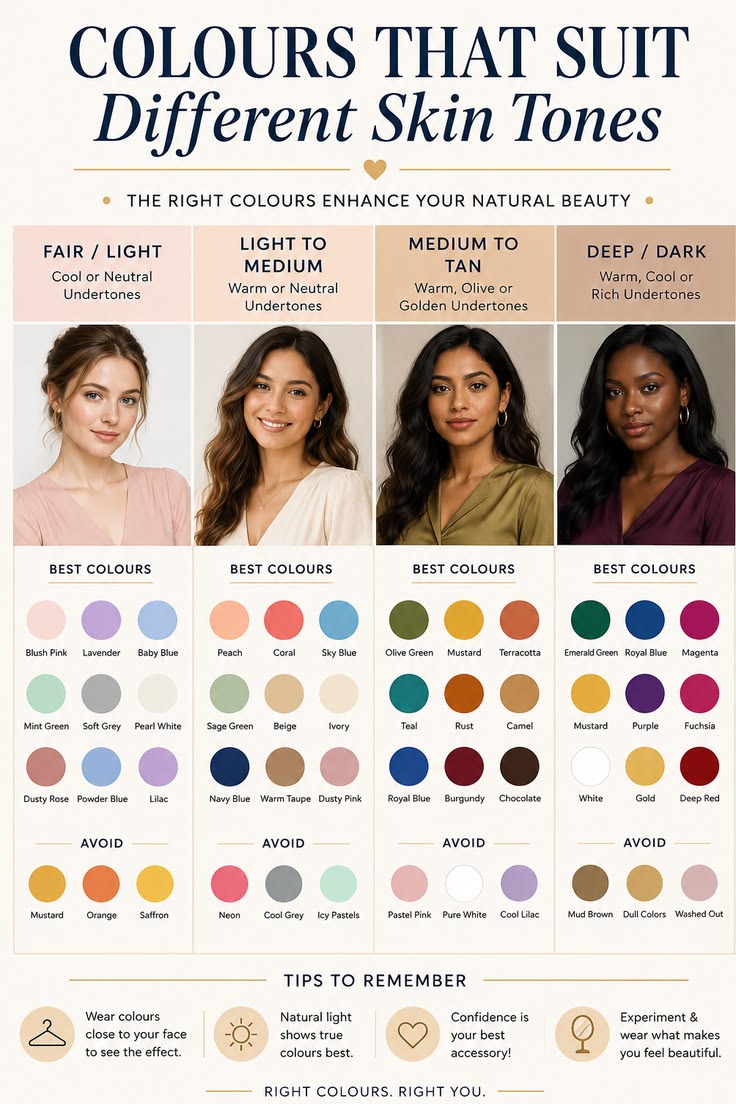
Skin-tone matching is a matrix, not a model
Onboarding optionally collects skin tone (fair / wheatish / medium / tan / deep). If it's there, colour scoring uses it:
function scoreColor(session: SessionPreferences, item: InventoryItem): number {
  // Palette = flattering skin-tone colors ∪ occasion colors. No skin tone + no mapped
  // occasion → flat noData (unchanged behavior for skipped / kids / couple / `other` rows).
  const palette = new Set<Color>(session.skin_tone ? SKIN_TONE_COLORS[session.skin_tone] : []);
  for (const occ of session.occasions) for (const c of OCCASION_COLORS[occ] ?? []) palette.add(c);
  if (palette.size === 0) return COLOR_WEIGHTS.noData;
  return item.colors.some((c) => palette.has(c)) ? COLOR_WEIGHTS.match : COLOR_WEIGHTS.none;
}
The palette is a union, not an intersection - colours that suit the person, plus colours that suit the event. And when skin tone is null, the score is a flat noData rather than a penalty, so skipping a personal question costs the customer nothing in the results. That mattered more than it sounds: an optional field that quietly degrades your recommendations isn't optional.
The matrices themselves are hand-written from colour theory, living in lib/scoring/matrices.ts:
fair:     ['navy', 'emerald', 'burgundy', 'maroon', 'royal_blue', 'black']
wheatish: ['emerald', 'burgundy', 'maroon', 'royal_blue', 'gold', 'mustard', 'rust', 'teal']
medium:   ['burgundy', 'emerald', 'royal_blue', 'maroon', 'gold', 'orange', 'crimson']
tan:      ['white', 'ivory', 'gold', 'coral', 'teal', 'magenta', 'crimson']
deep: ['white', 'ivory', 'gold', 'yellow', 'crimson', 'cobalt', 'fuchsia']haldi: ['mustard', 'yellow', 'orange', 'ivory']
mehendi: ['green', 'olive', 'emerald', 'yellow', 'teal']
wedding: ['crimson', 'maroon', 'burgundy', 'emerald', 'gold', 'royal_blue', 'magenta']
sangeet: ['royal_blue', 'magenta', 'emerald', 'burgundy']
cocktail: ['black', 'burgundy', 'royal_blue', 'emerald', 'magenta']Nine occasions, five tones, one lookup. A model could have produced something like this, at the cost of latency, non-determinism, and an answer nobody in the shop could argue with.
Couples
For a couple, the engine scores pairs:
score = 0.6 × coupleCompatibility + 0.4 × individual
Compatibility blends a colour-harmony matrix with theme and fabric. The harmony matrix is the part that reads like a stylist wrote it, because it is:
maroon:     { ivory: 95, gold: 95 }
royal_blue: { gold: 90, ivory: 90 }
emerald:    { champagne: 88, gold: 88 }
lavender:   { grey: 82, blush: 82, champagne: 82 }
Alongside it, a gallery of real couple photos as inspiration - and those looks can be tried on directly, where one generation dresses both partners from a single couple photo.
What it refuses to do
- Billing records payments; it processes none. Cash / UPI / Card / Net Banking with a mode-specific field, tax computed server-side, printable invoice. No gateway. A boutique already has a card machine.
- Returns are record-only in V1 -
dress_idplus notes, stock reconciled by hand. - Out of scope entirely: public storefront, rentals, appointment scheduling, customer self-service, multi-store SaaS, SMS/WhatsApp.
And the invariants worth keeping in a codebase two people will touch later: lib/scoring/ stays pure; GROQ_API_KEY, OPENAI_API_KEY, INSFORGE_API_KEY and SESSION_SECRET are server-only and never reach the client bundle; every enum string comes from lib/constants.ts; prices render through formatINR(); dress_id is unique and never reused, because billing and returns both key off it; passwords are bcrypt hashes; no hex values in components, tokens only.
Data model
All of it in InsForge Postgres: store_settings, staff, inventory_items (with a details jsonb for the rich detail page), styling_sessions, recommendations, tryons (generating → ready / failed), bills + bill_items, returns, and demo_visitors for the OTP gate. Three storage buckets: inventory-images public, customer-photos and tryon-previews private - the ones holding a customer's face are not the public ones.
Try it
The demo is live; /try is the email-OTP gate that walks you in. The seeded staff logins are in the repo's README rather than here - they're credentials for a running deployment, and a blog post is a worse place to leave them lying around.